
A practical guide to reliable printing
in busy restaurant operations
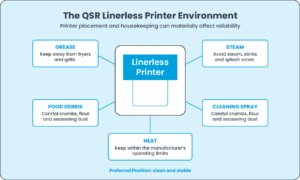
Heat, humidity, grease, steam, food particles and continuous high-volume use make QSR
kitchens a demanding environment for Linerless printing.
Why maintenance matters in QSR
Linerless label printers are increasingly used across quick service restaurant workflows, including kitchen preparation, beverage identification, drive-through, takeaway, click-and-collect and third-party delivery. Because the adhesive surface passes directly through the printer, correct media selection and preventative maintenance are especially important.
In a busy restaurant, a printer fault during a service peak can affect order identification, preparation, packing and hand-off. Maintenance is therefore not simply a hardware task; it supports operational continuity and order accuracy.
Where Linerless printers are used
Common applications include kitchen preparation labels, drink and cup identification, drive-through orders, takeaway bags, delivery packaging and catering. Linerless printing is particularly useful where variable-length labels reduce material use and where eliminating release liner reduces waste at the workstation.
The QSR environment is different
A printer installed at a front counter may experience very different conditions from the same printer located close to a hot preparation line. Printer placement, housekeeping and cleaning practices should form part of the maintenance plan.
Environmental risks to manage
Grease and airborne cooking residue: Fine cooking oils can settle on printer surfaces and combine with paper dust or adhesive residue. Where practical, keep printers away from fryers, grills and other sources of airborne grease.
Heat: Avoid unnecessary exposure to ovens, grills, fryers and heat lamps. Operate the printer within the manufacturer’s specified environmental limits.
Steam, humidity and splashes: Avoid direct steam, sinks and obvious splash zones unless the equipment and installation are specifically designed for those conditions.
Food particles and powders: Crumbs, flour, seasoning and other debris can enter through the media exit or while the cover is open. Keep the immediate printer area clean.
Cleaning chemicals: Never spray sanitiser, degreaser or other restaurant cleaning chemicals directly onto the printer. Chemicals suitable for food-contact surfaces may damage printer components.
A Simple Preventative maintenance
A practical QSR maintenance routine
Before service
- Confirm sufficient Linerless media is loaded and correctly installed.
- Check that print is clear and labels feed and cut normally.
- Look for obvious adhesive build-up, debris or obstruction at the label exit.
During service
- Watch for labels curling, sticking or hesitating at the exit.
- Act on incomplete cuts, unusual noises, fading print, white lines or repeated media errors.
- Do not repeatedly clear jams without investigating the underlying cause.
After service / roll changes
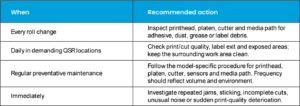
- Inspect the printhead, platen, cutter and media path.
- Remove loose debris using the printer manufacturer’s approved method.
- Use quieter periods for preventative cleaning rather than waiting for a peak-time failure.
Important: cleaning procedures differ between printer models. Never assume that a Cleaning fluid suitable for the printhead is also suitable for a Linerless platen roller.
Special attention: the linerless platen roller
Many Linerless printers use a specially treated or coated platen roller to reduce adhesion. Zebra guidance for several desktop and industrial Linerless models specifically warns against washing, scrubbing or using solvent on the Linerless platen; particles are instead lifted using the adhesive side of Linerless media. Other models can specify different methods, so always follow the exact printer manual.
- Do not scrape the platen with knives, screwdrivers or metal tools.
- Do not aggressively rub a specialist non-stick surface.
- If media continues to stick or bind after correct cleaning, the non-stick surface may be worn and the platen may need replacement.
Protect the thermal printhead
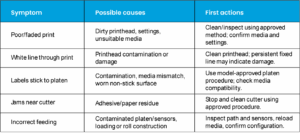
A contaminated printhead can cause faded printing, inconsistent density or white lines through text and barcodes. Allow the printhead to cool before cleaning and use only the method approved for the model. If print quality suddenly deteriorates, inspect and clean before substantially increasing print darkness.
Pay attention to the cutter and sensors
Variable-length Linerless printing can place frequent demand on the cutter. Adhesive and paper residue may contribute to incomplete or ragged cuts, sticking around the exit, cutter errors or jams. Sensors can also be affected by dust and contamination, causing media-out, feed or calibration errors. Clean both areas only as directed by the manufacturer.
Media storage in restaurants
- Keep unopened rolls in their protective packaging until required.
- Store in a clean, dry location away from grease, heat, direct sunlight and cleaning chemicals.
- Avoid leaving unwrapped spare rolls beside the printer for long periods.
- Use Linerless media tested for the printer and the final foodservice application.
Recommended QSR maintenance approach
Good Linerless media can reduce maintenance
Printer reliability depends on the complete system: thermal coating, release coating, adhesive, roll construction, printer mechanics, cutter performance and final application. In QSR, the label may need to adhere to paper bags, board packs, cups, food containers or delivery packaging under warm, ambient, chilled or condensation-prone conditions. Printer, media and application should therefore be tested together.
Troubleshooting quick reference
Printer manufacturers and QSR context
Linerless-capable printers are offered by manufacturers including Zebra Technologies, Star Micronics, Toshiba Tec and Epson. Product designs and maintenance instructions vary. Some are explicitly positioned for fast-food, restaurant, delivery, drive-through or similar foodservice workflows. Fortoak should therefore specify compatible media and maintenance guidance by printer model rather than applying one universal cleaning method.
Fortoak: Linerless solutions for QSR & foodservice
At Fortoak, successful Linerless printing is about more than supplying a roll of labels. The label needs to work with the printer, operating environment and final application. When assessing a QSR installation, consider printer make and model, print/cut volume, workstation location, label size, adhesive requirement, packaging substrate, hot/ambient/chilled use, print quality, cutter performance and overall cleanliness.
Experiencing adhesive build-up, sticking, poor cutting or excessive printer cleaning? Talk to Fortoak about the printer, Linerless media and application as one complete system.
Reference sources
- Zebra – Cleaning and Replacing the Platen (ZD421/ZD621) – https://docs.zebra.com/us/en/printers/desktop/zd421-and-zd621-desktop-printers-user-guide/maintenance/cleaning/cleaning-and-replacing-the-platen.html
- Zebra – Recommended Cleaning Schedule (ZD421/ZD621) – https://docs.zebra.com/us/en/printers/desktop/zd421-and-zd621-desktop-printers-user-guide/c-zd421-zd621-ug-maintenance/c-zd200t-ug-cleaning/r-zd620-zd420-ug-recommended-cleaning-schedule.html
- Zebra – What Are Linerless Labels? – https://www.zebra.com/gb/en/resource-library/faq/what-are-linerless-labels.html
- Star Micronics – manufacturer website – https://starmicronics.com/
- Toshiba Tec – manufacturer website – https://www.toshibatec.eu/
- Epson UK – manufacturer website – https://www.epson.co.uk/